
To maintain clarity, consistency, and operational efficiency across Pearagon’s HubSpot instance, all workflows must follow standardized naming and categorization practices. These conventions ensure every team can quickly identify, understand, and manage workflows across departments.
The image below reflects the required custom properties when creating a new workflow in HubSpot:
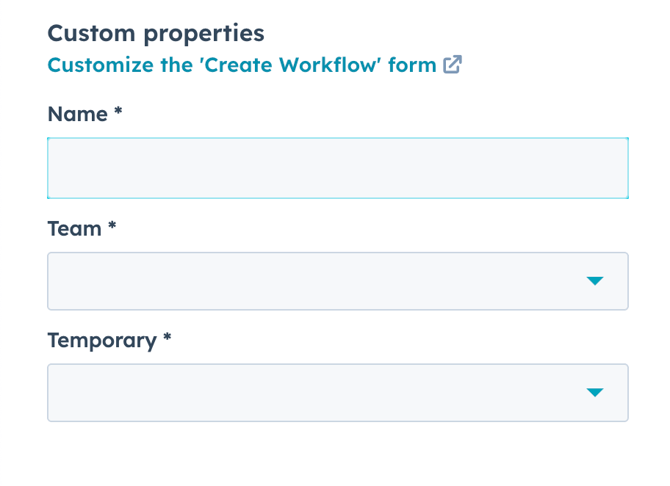
📋 Required Fields
| Field | Description |
|---|---|
| Name | A clear, standardized title summarizing the workflow's category, owner, and purpose. |
| Team | The primary department or role responsible for managing the workflow. |
| Temporary/Category |
Indicates whether this is a permanent system workflow or a short-term/testing flow.
|
Naming Convention Format
To streamline identification and reporting, all workflow names should follow this format:
[Category] – [Team] – [Purpose/Trigger] – [Outcome]
Examples:
-
Onboarding – CS – New Client Kickoff – Task Generation -
Marketing – RevOps – MQL Lifecycle – Lead Score Trigger -
Sales – AE – Deal Lost – Send Survey
Categories (Primary Areas of Pearagon’s Business)
Use one of the following approved categories to begin each workflow name. This ensures that workflows are grouped and searchable by business function.
| Category | Definition |
|---|---|
| Onboarding | Client kickoff, internal task automation, service team handoffs. |
| Sales | SDR, AE, or SalesOps workflows – deal stages, follow-ups, lead routing. |
| Marketing | Nurture sequences, MQL scoring, form submissions, contact list segmentation. |
| RevOps | CRM cleanup, lifecycle syncs, integrations, scoring logic, admin processes. |
| Support | Ticket creation, CSAT/NPS follow-up, service-level alerts, or escalations. |
Best Practices
-
Use Title Case: Capitalize each word in workflow names for legibility.
-
Be Descriptive: Summarize the workflow’s trigger and outcome clearly.
-
Avoid Duplication: Don’t repeat the team name in the workflow body if it’s already in the “Team” field.
-
Tag Temporary Flows: Use the “Temporary” flag to keep test workflows contained.
-
Archive on Schedule: Set a recurring calendar reminder to review and sunset unused or temporary workflows.
Pro Tips (Optional Enhancements)
-
Use internal tags like
#auto-cleanup,#manual-start, or#monthly-reportingin the workflow description for filtering. -
Include a version date if the workflow is tied to a time-based campaign (e.g.,
– 2025 Q2 Campaign). -
Organize workflows in folders within HubSpot by Category → Team → Purpose for visibility.